SweetDate CLI
The SweetDate CLI is a developer tool for working with the SweetDate Implementation Protocol (SDIP).
It takes the protocol definition (provided as JSON) and:
- Generates starter templates for implementing client libraries in different programming languages.
- Runs automated conformance tests to verify correct protocol behavior.
Purpose
The SweetDate CLI ensures secure, consistent, and verifiable implementations of client libraries.
- It scaffolds a complete set of protocol commands for each supported language.
- It provides a Universal Conformance Driver to test that implementations behave exactly as expected.
This guarantees that client libraries across Ruby, Elixir, PHP, and future languages stay aligned with the SweetDate protocol — both in structure and in runtime behavior.
Flow
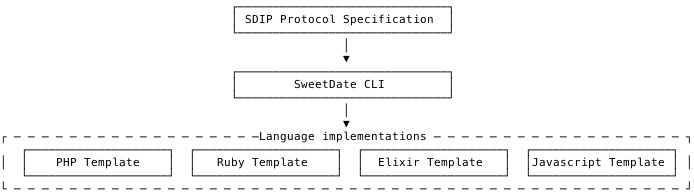
- Input: A JSON specification of the SDIP (SweetDate Implementation Protocol).
- Output: Language-specific scaffolding code (Ruby, Elixir, PHP, …).
- Verification: Optional conformance testing against a live SweetDate instance.
Configuration
The CLI reads a configuration file (sd.config.json) in the project root.
This file defines the protocol location, output folders, and optional test configuration.
Example:
{
  "protocol": "protocol-version-01/protocol.json",
  "targets": {
    "ruby": {
      "output": "out/ruby"
    },
    "elixir": {
      "output": "out/elixir"
    }
  },
  "test": {
    "base_url": "http://localhost:4000",
    "implementations": {
      "ruby": "bin/test-ruby-client",
      "elixir": "bin/test-elixir-client"
    }
  }
}
Conformance Testing
The CLI includes a Universal Conformance Driver that invokes client implementations and verifies they respond correctly to each command defined in the protocol.
Command
sd test <language> [--only=COMMAND] [--trace]
Example
sd test ruby
sd test elixir --only=TENANTS.GET_LIST
Expected Behavior
The language-specific implementation must expose a way to:
- Receive a request (typically via CLI, TCP, or JSON-RPC)
- Execute the specified protocol command
- Return the result or error in the expected format
The CLI will:
- Send a request for each command
- Validate the structure, data types, and semantic output
- Mark the test as passed or failed
Protocol Definition Files
The SweetDate CLI generates code based on the SweetDate Implementation Protocol (SDIP).
These definitions are stored as JSON files in the project root, organized by protocol version.
protocol-version-01/
  ├─ calendars.json
  ├─ tenants.json
  ├─ users.json
  └─ events.json
Example structure:
{
  "TENANTS": {
    "commands": [
      {
        "name": "GET_LIST",
        "description": "Returns tenants ordered by name ascending.",
        "params": {
          "limit": {
            "type": "integer",
            "required": false,
            "default": 25,
            "min": 1,
            "max": 100,
            "description": "Maximum number of items to return."
          },
          "offset": {
            "type": "integer",
            "required": false,
            "default": 0,
            "min": 0,
            "description": "Number of items to skip."
          }
        },
        "response": {
          "type": "tenant_list",
          "description": "Paginated list of tenants (ordered by name asc).",
          "example": {
            "status": "ok",
            "result": {
              "tenants": [
                {
                  "id": "t1",
                  "name": "Alpha",
                  "account_id": "acc-123",
                  "inserted_at": "2025-08-18T09:20:00Z",
                  "updated_at": "2025-08-19T10:15:00Z"
                },
                {
                  "id": "t2",
                  "name": "Beta",
                  "account_id": "acc-456",
                  "inserted_at": "2025-08-18T11:00:00Z",
                  "updated_at": "2025-08-18T11:00:00Z"
                }
              ],
              "limit": 25,
              "offset": 0
            }
          },
          "error_example": {
            "error": "invalid",
            "details": {
              "limit": ["must be between 1 and 100"],
              "offset": ["must be >= 0"]
            }
          }
        }
      }
    ]
  }
}
Let me know if you’d like a diagram or dedicated page for the Conformance Test Protocol as well.